
Free until the new year
01Use StudyKind free for the rest of Term 4 and the summer holidays. Nothing is charged unless you choose to continue once paid plans start.
Photograph the school timetable. StudyKind turns it into short quizzes, recaps and focus sessions, 5 to 15 minutes each, sized to the energy your child has tonight. Five minutes counts. Starting counts.
Free during the beta. Setup takes about five minutes. A parent or guardian creates and controls the account.
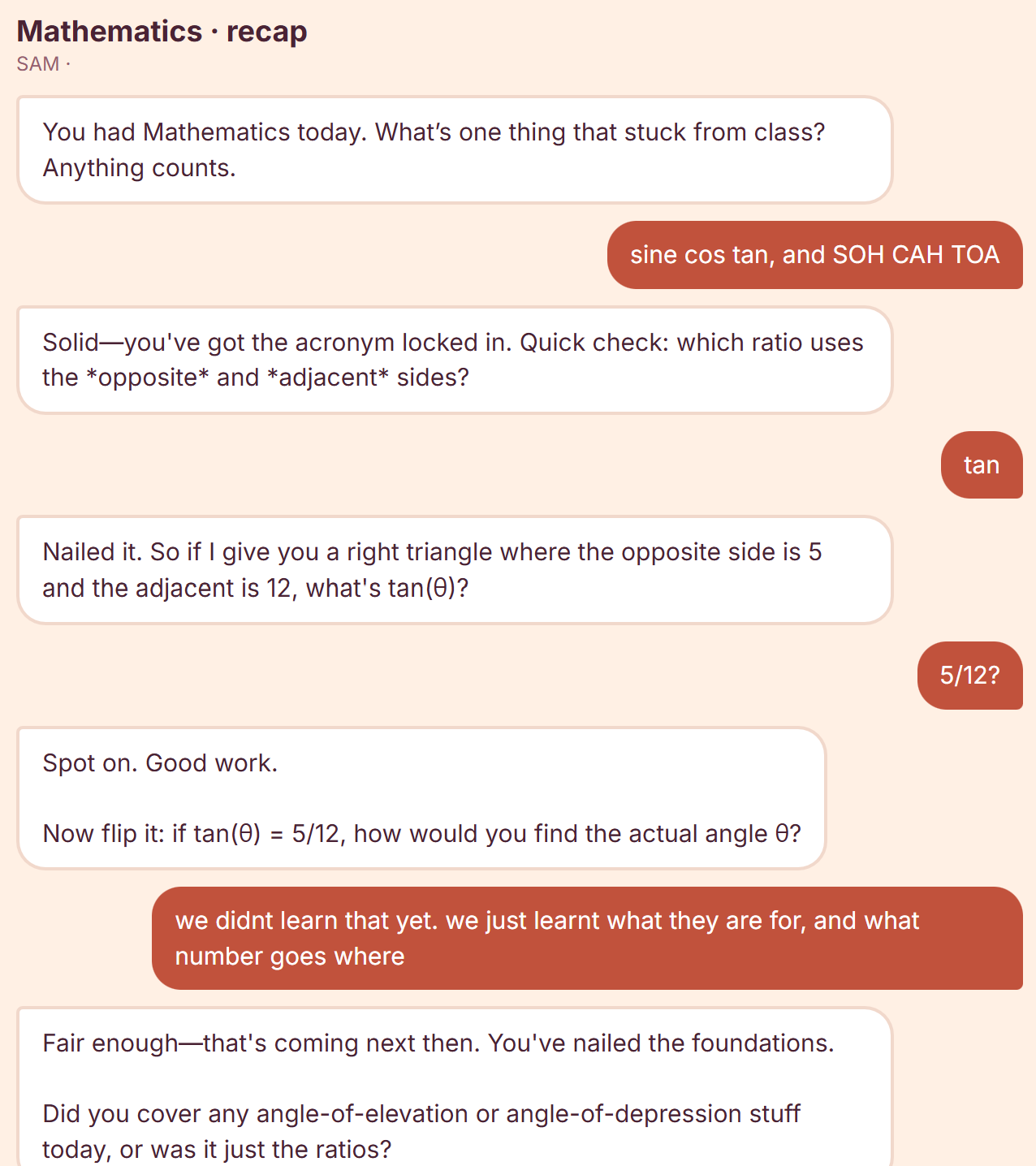
Setup is a photo: StudyKind reads the school timetable into an editable plan, then offers one short activity at a time — a quiz, a recap of the day in conversation, or a simple focus timer, 5 to 15 minutes. The student steers, and streaks, XP and unlockable themes make coming back the easy part.
A parent or legal guardian creates and controls the household account, with visibility of what's being studied — kids never talk to an unsupervised chatbot.
Important facts, teacher instructions and assessment requirements should always be checked against original school materials — AI responses can be incomplete or wrong.
StudyKind is an educational support tool. It doesn't diagnose or treat ADHD, and it isn't a replacement for a teacher, tutor or healthcare professional.
We're a small family business in Queensland, and we built StudyKind for our own kitchen table first. Now we want more families using it before the 2027 school year starts.
Use StudyKind free for the rest of Term 4 and the summer holidays. Nothing is charged unless you choose to continue once paid plans start.
Create the account, confirm your email and set up tonight. There's no invitation code and no approval queue any more.
Try it with your child for two weeks, then tell us honestly what helped and what didn't. A 15-minute chat or a few lines by email is plenty.
Yes, for the rest of 2026. Paid plans start in Term 1 2027 at $49.99 a year or $4.99 a month, and we'll email you before anything changes. Nothing is charged unless you choose to continue.
Any student with a school timetable. It's built around the Queensland school year, and works best for students who have a few subjects and assessments to keep track of.
Your child uses short, structured activities built from their own school subjects. You create and control the family account and can see what they've studied. Kids never use an unsupervised chatbot.
We designed it around the study barriers our own ADHD family faces: starting, organising and sticking with it. You don't need a diagnosis to use it.
StudyKind runs in the browser on any phone, tablet or computer. Add it to the home screen and it behaves like an app.
We don't show ads and we don't sell data. You can delete your family's account and data at any time from settings. See StudyKind's privacy notice.
StudyKind is open to every family for Term 4. Create the account, add the timetable, and your child can start their first five-minute session tonight.
Start free for Term 4